


The Rundown: ChatGPT Voice allows you to practice and improve your language skills through interactive conversations and roleplay scenarios.
🧰 Who is this useful for:
- Language learners at all levels looking for interactive practice
- Busy professionals wanting to improve language skills on-the-go
- Students preparing for language exams or travel abroad
- Anyone interested in immersive language learning experiences
STEP 1: Set Up Your Voice Chat Environment
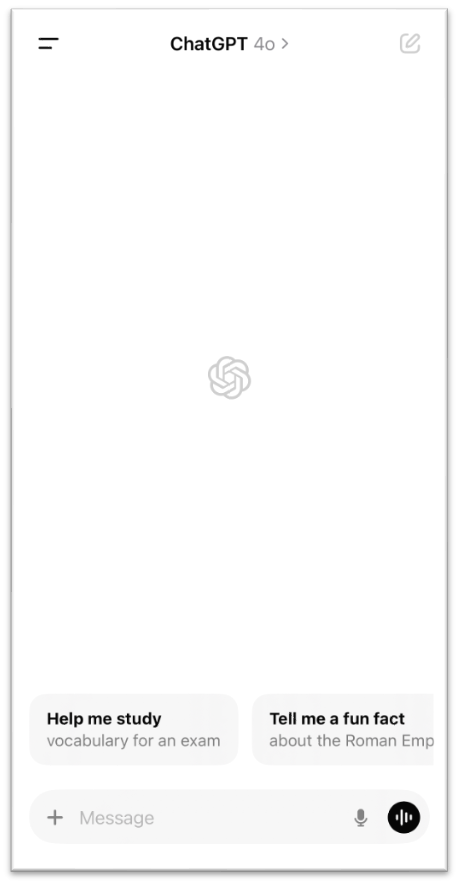
To get started with AI language learning, you'll need to download the ChatGPT app.
Once you have the app installed and the voice mode enabled, you're ready to start. Please note that you can also follow this tutorial with the standard voice.
STEP 2: Prepare Your Prompt
The key to effective AI-assisted language learning is creating a detailed prompt that guides the AI in providing the type of practice you need. Here's a template you can use and customize:
"You are a native speaker of [target language]. I am a [beginner/intermediate/advanced] learner. Please engage in a conversation with me about [topic], using simple vocabulary and grammar suitable for my level. Correct any mistakes I make, offer alternative phrases, and provide explanations in both [target language] and English when needed. If I struggle, please speak more slowly and offer simpler alternatives."
For example, if you're a beginner learning Spanish, your prompt might look like this:
"You are a native speaker of Spanish. I am a beginner learner. Please engage in a conversation with me about ordering food in a restaurant, using simple vocabulary and grammar suitable for my level. Correct any mistakes I make, offer alternative phrases, and provide explanations in both Spanish and English when needed. If I struggle, please speak more slowly and offer simpler alternatives."
STEP 3: Start Your Language Learning Session
With your prompt ready, it's time to start your session:
1. Open the ChatGPT app and navigate to the chat interface.
2. Tap the microphone icon to activate voice mode.
3. Speak your prepared prompt clearly into the microphone.
4. Wait for the AI to process your request and respond.
STEP 4: Engage in Interactive Conversation
Once the AI responds, you'll be able to engage in a back-and-forth conversation:
- Listen carefully to the AI's response. If it's too fast, you can say "Más despacio, por favor" (Slower, please) or "Can you repeat that?"
- Respond to the AI's questions or comments in the target language to the best of your ability.
- Pay attention to any corrections or suggestions the AI provides.
As you become more comfortable with basic conversations, you can explore more advanced learning techniques:
- Roleplay Scenarios: Use prompts like the one in the video to practice specific situations, such as asking for directions or ordering in a restaurant.
- Grammar Focus: Ask the AI to focus on particular grammar points you're struggling with.
- Vocabulary Building: Request conversations around specific themes to build your vocabulary in areas of interest.
- Pronunciation Practice: Ask the AI to focus on your pronunciation and provide detailed feedback.
Pro Tip: Save effective prompts in your notes for quick access in future sessions. You can also add them to your custom instructions in the app settings for consistent practice across multiple conversations.









CustomersWhy Schools love Athena
Community of 8k+ members.
I used to spend hours creating differentiated worksheets with limited impact. Now, I can see exactly where each student is struggling in real-time. I noticed six students struggling with fraction division conceptually, so I pulled them for a targeted mini-lesson while others continued progressing independently.

FAQs
Is Athena safe and compliant with educational privacy standards?

Can Athena be used for different subjects?
How does Athena handle feedback and improve its AI models?
How does Athena provide personalized learning for each student?
What is Athena, and how does it help teachers and students?
How can I get my school or district on board?
How does Athena support responsible AI use for students?
What happens with student data?
Related blogs

2025-06-16 06:28:00 K-12
The Socratic Method of Teaching: Save These Examples & Tips
2025-11-18 11:17:00AI
Magic School AI vs 6 of the Most Mentioned AI for Teachers: Which Tool Is the Best for You?

2025-08-22 23:29:00AI
48 Best ChatGPT Alternatives: ChatGPT is Not the Only Tool for Education
2025-10-20 07:30:00How To
How To Use Perplexity AI for Teaching: Feature Deep Dive + Actionable Use Cases

2025-01-26 21:16:00News
Must-Read Top 10 Trends in Education 2025 and Actionable Insights for Teachers
2025-04-21 17:18:00News
10 Must-Have AI Tools for Teachers in 2025: Enhance Classroom Engagement with ChatGPT and Beyond
2025-08-27 03:13:00K-12
How Athena AI is Transforming K-12 Education Challenges Today
2025-06-04 04:56:00Guide
How to run AI privately on your own computer
2025-06-04 04:56:00New
Learn a new language with ChatGPT Voice
2025-10-22 07:30:00K-12
Top 8 Free Word Cloud Generator Apps You Need to Try in 2025
2025-02-14 04:28:00K-12
8 Best AI-Powered Teaching Assistants For the Busiest Teachers in 2025

2025-04-21 17:18:00AI
10 Effortless Ways to Use AI for Lesson Planning
2025-02-18 04:28:00AI
Top 20 Classroom Apps for Teachers to Use in 2025

2025-08-19 23:29:00
The 12 Best Free AI PowerPoint Generators in 2025
2025-06-08 17:09:00
The Socratic Method of Teaching: Save These Examples & Tips

2025-06-03 17:09:00
The Ultimate Gen Z Terms Dictionary for your class (Latest Top 70 Slangs You Need to Know)!

2025-05-21 10:41:00
Top 9 Key Gen Alpha Characteristics Teachers & Parents Must Know!

2025-05-25 21:39:00AI
How Easy It Is to Create a ChatGPT Lesson Plan: A 7-Step Guide for Beginners
2025-06-02 04:56:00Updates
How to generate comprehensive research reports with Perplexity Labs
2025-05-05 22:56:00
How to get ChatGPT to stop lying: 6 actionable tips for product managers

Secure, Private, and Built for Schools


